2025-01-1016:25
Status:Incomplete
Tags: Computer Science Object Oriented Programming
Source(s):
https://www.youtube.com/watch?v=xk4_1vDrzzo
Overview/setup
Java is a high level language and is the 3rd most popular programming language. Source code (what is written be developers) is complied to byte code (an intermediate, cross-platform, portable version of the code) that can then be translated by a JVM to run on a local machine. This is done to cater to the operating system - compilation on a Mac system will differ from Windows.
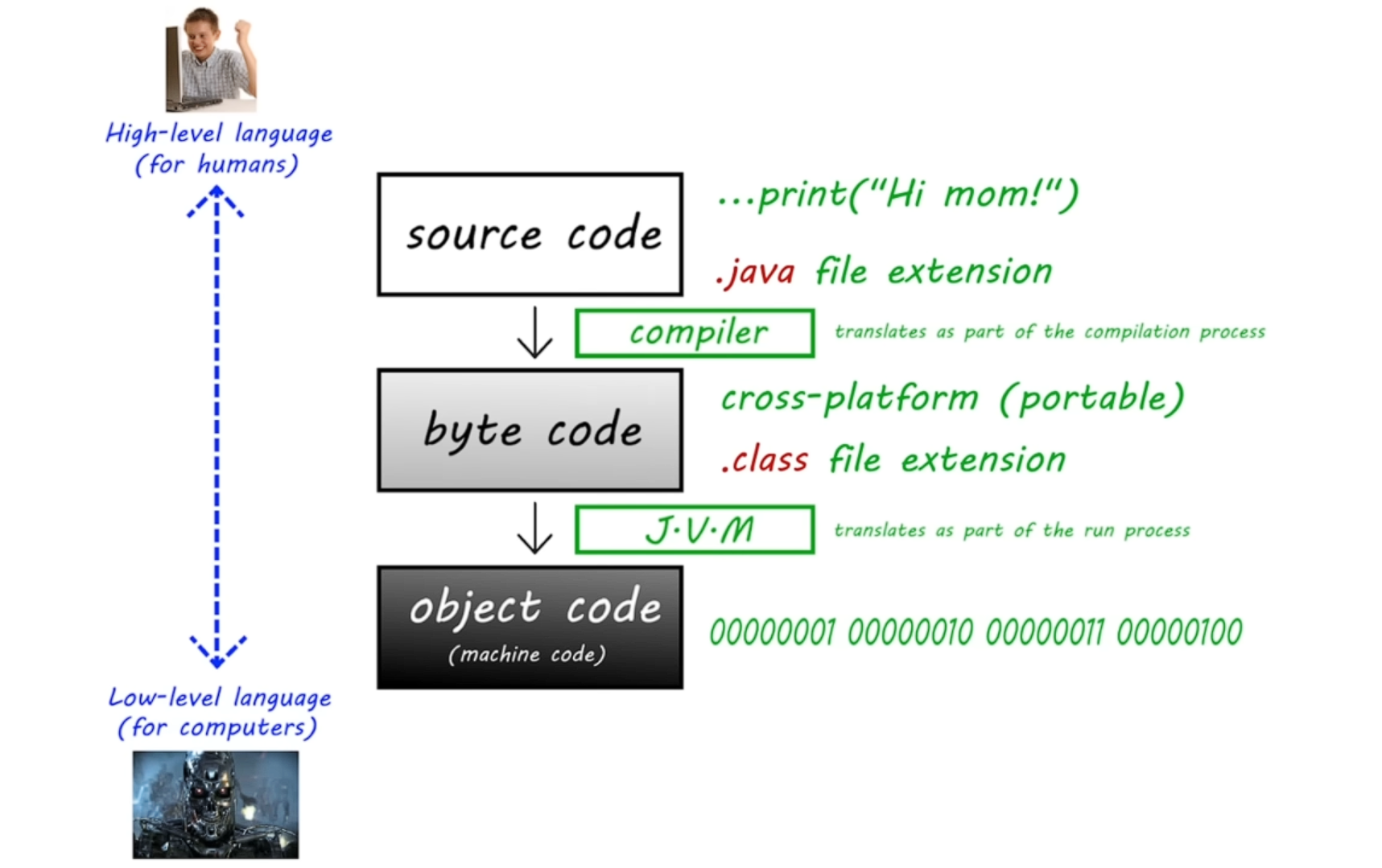
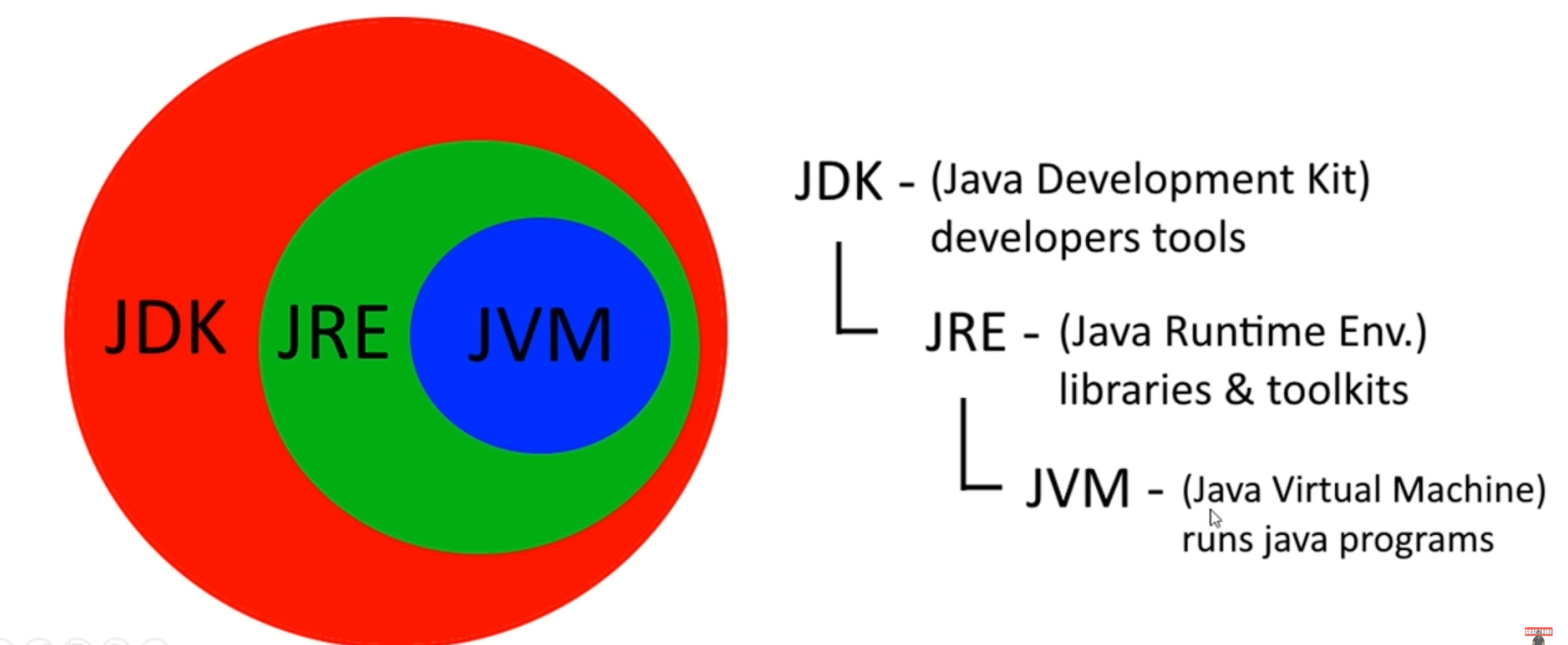
A JVM is a “translator” of byte code to machine code. It is included in a JDK (Java Developer’s Kit). A JDK also contains a JRE (Java Runtime Environment) which is a collection of libraries and toolkits. The JVM (Java Virtual Machine) is in the JRE and it is used to run programs.
 The Oracle SE JDK is the most common JDK
An IDE is also needed (Integrated Developer Environment) → Eclipse and IntelliJ are the most popular.
To create a Java Explorer in Eclipse follow: https://www.youtube.com/watch?v=xk4_1vDrzzo 7:00
Fundamental Methods
Main
Every program will contain some sort of main method to run. It should look like this:
public class Main {
	public static void main(String[] args) {
		// code goes here
	}
}To print text to the terminal, use the method, System.out.print();.
public class Main {
	public static void main(String[] args) {
		System.out.print("I love pizza");
	}
}
Terminal output:
I love pizza
The cursor does not move down the next line, so if the following runs,
public class Main {
	public static void main(String[] args) {
		System.out.print("I love pizza.");
		System.out.print("It's really good!");
	}
}
Terminal output:
I love pizza.It's really good!
To make a new line after a print statement, use .println (print line) instead of .print
public class Main {
	public static void main(String[] args) {
		System.out.println("I love pizza.");
		System.out.println("It's really good!");
	}
}
Terminal output:
I love pizza.`It’s really good!
An escape sequence character, "" is used to perform special operations within print statements. So another way to make another new line in a print statement is to use \n where the new line is intended to be.
public class Main {
	public static void main(String[] args) {
		System.out.println("I love pizza.\n It's really good!");
	}
}
Terminal output:
I love pizza.`It’s really good!
Some other escape sequences are: \t adds a tab, \" adds a double quote, \\ adds \
Concatenating Expressions
To add expressions together (often a variable and a string literal), use + to combine the expression:
public class Main {
	public static void main(String[] args){

		int x = 123; //initialization
		System.out.println("My number is:" + x);
	}
}
Terminal Output
My number is: 123
Tips and Tricks:
- For Eclipse,
System.out.println();=sysout + Ctrl + Space - For IntelliJ,
System.out.println();=sysout + Tab - Find-replace command is very useful for changing the behavior of code.
- In most cases whitespace (spaces, tabs, new lines) in source code (not print statements, nor keywords), do not affect the program’s behavior:
System.out.print();=System.out. print();. - It’s always a good idea to close the scanner by using
scanner.close();
Comments
To comment code, write two forward slashes, // preceding the line of code that is to be commented out. To comment out multiple lines, use /* and */ to wrap a comment over multiple lines. Eclipse will automatically add * at the beginning of the commented line not at the ends of the comment. However, the * is not necessary.
public class Main {
	public static void main(String[] args) {
		// System.out.println("I love pizza.\n It's really good!");

		/*  System.out.println("I love pizza.");
		*	System.out.println("It's really good!");
		*/

		/*  System.out.println("I love pizza.");
		 	System.out.println("It's really good!");
		*/
	}
}
Terminal output:
Variables
Definition
Primitive Data Types
There are 8 primitive (built into Java):
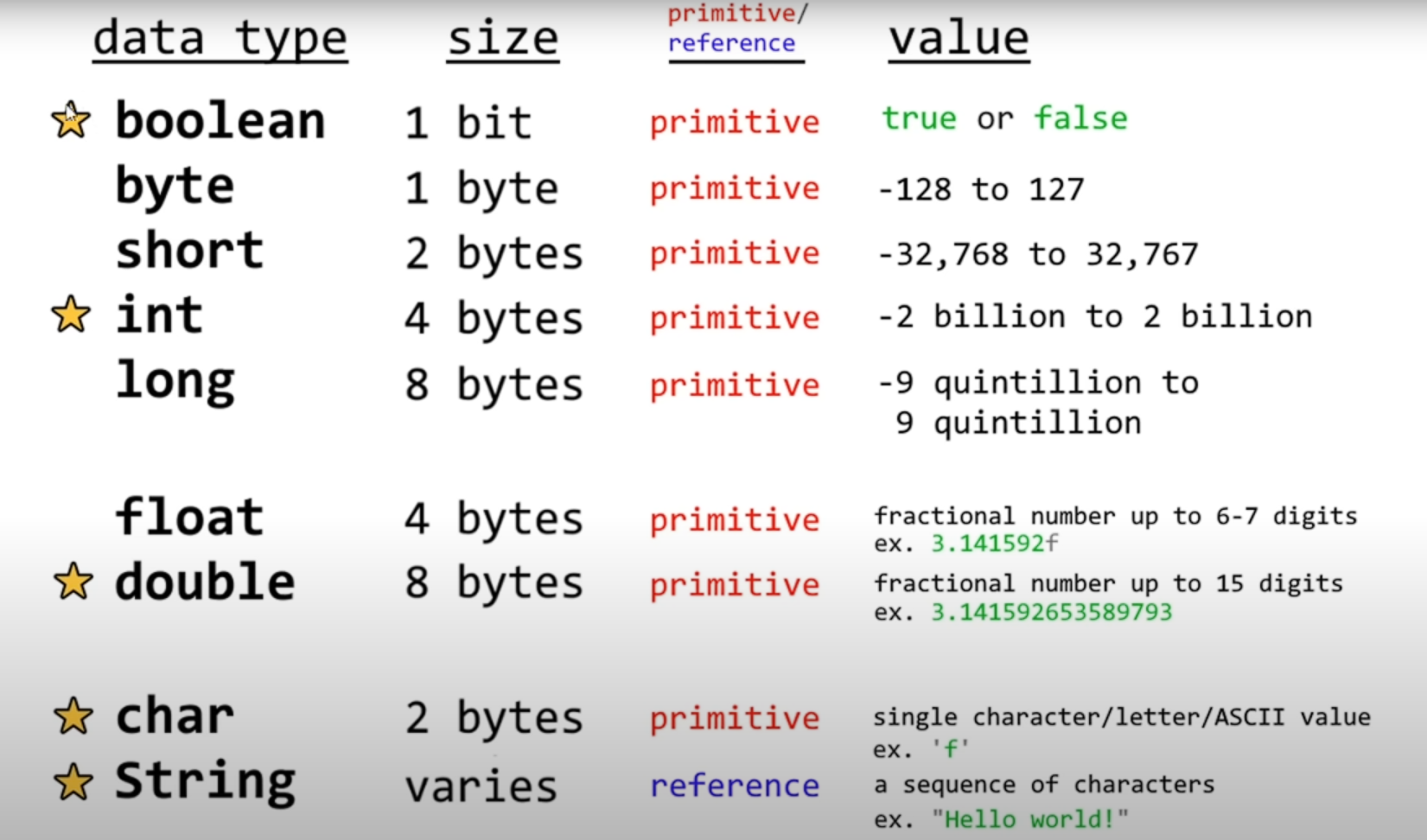 The convention for float values is to end the value with ‘f’
The convention for char values is to wrap the value with single quotation marks
The convention for String values is to wrap the value with double quotation marks
The convention for Long values is to end the value with ‘L’
The convention for float values is to end the value with ‘f’
The convention for char values is to wrap the value with single quotation marks
The convention for String values is to wrap the value with double quotation marks
The convention for Long values is to end the value with ‘L’
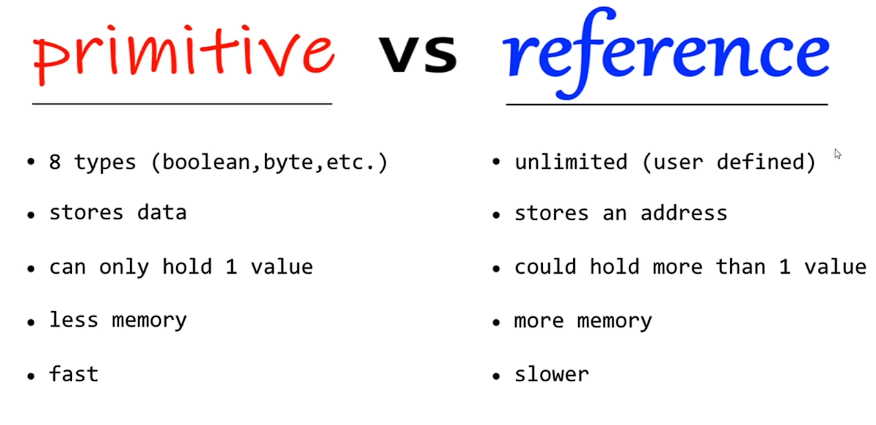
Primitive vs. Reference Data Types
Declaration of Variables
- To declare a variable, state the type e.g.
intand the variable name, sayx.int x;
- To assign a variable to a value, ensure the value is of a valid type and ‘equate’ them with and equal sign. This requires the variable to first be declared (defined).
x = 123;
- To initialize a variable combine the declaration and assignment of the variable into one step.
int x = 123;
User input
To take text input from the console, the java.util library must be imported.
import java.util.Scanner;

public class Main {
	public static void main(String[] args){

		Scanner scanner = new Scanner(System.in);
		System.out.println("What is your name? ");
		String name = scanner.nextLine();

		Sysyem.out.println("Hello "+name);
	}
}
Terminal output:
What is your name?> JohnHello John
The type of the input must match the type of variable. E.g. answering “Three” to int x = scanner.nextLine();would throw an exception back. Keep in mind that the scanner ends when it finds \n break. nextint is used it will find the next integer value and return it. If the user entered 18 then pressed enter, the scanner would read only the 18 and not the \n. So when the scanner tries to read the next input, it will return nothing. To avoid this error, write scanner.nextLine(); as an intermediate step to clear the extra new line.
Manipulation
Swapping Variables
Think of variables as cups of different liquids. In order to swap the fluid, you need to transfer one of the liquids to a temporary cup, then transfer.
xtemp, thenyx, thentempy.
public class Main {
	public static void main(String[] args){

		String x = "water";
		String y = "Kool-Aid";
		String temp;

		temp = x;
		x = y;
		y = temp;
	}
}
Expressions
Arithmetic
- Regular operations,
+,-,xetc. still apply. - Regular inequality expressions return boolean values
><etc. - To check for equality of variables,
\==(ignore the\) - Modulus
%takes the remainder of ++is the shorthand for incrementing by one--is the shorthand for decrementing by one- To find the max of two numbers,
Math.max(x, y) - To find the min of two numbers,
Math.min(x, y) - The absolute value of
xisMath.abs(x, y) - The square root of
xisMath.sqrt(x) - To take
xto they-th power, useMath.pow(x, y) - To round a number use
Math.round(x) - To find the ceiling of a number use
Math.ceil(x) - To find the floor of a number use
Math.floor(x) - When dividing an integer the decimals are truncated (decimals cut off)
- To prevent this cast the integer divided into a using
(double)beforex/n;
- To prevent this cast the integer divided into a using
Boolean
- AND expressions =
&& - OR expressions =
|| - NOT expressions =
!
Random Number Generator
These a pseudo-random
import javal.util.Random;

public class Main {
	public static void main(String[] args){

	Random random = new Random();
	int x random.nextInt();
	System.out.println(x);

	}
}
Terminal output:
<Any number from ~ -2 billion to + 2 billion>
import javal.util.Random;

public class Main {
	public static void main(String[] args){

	Random random = new Random();
	int x random.nextInt(6)+1;
	System.out.println(x);

	}
}
Terminal output:
<Any number from 1 to 6>
import javal.util.Random;

public class Main {
	public static void main(String[] args){

	Random random = new Random();
	int x random.nextDouble;
	System.out.println(x);

	}
}
Terminal output:
<Any double from 0 to 1>
import javal.util.Random;

public class Main {
	public static void main(String[] args){

	Random random = new Random();
	int x random.nextBoolean;
	System.out.println(x);

	}
}
Terminal output:
<Either true or false>
Casting
- Casting a string to an integer:
Integer.parseInt(...) - Casting a string to a double:
Double.parseDouble(...)
Conditional Logic
If Else Statements
public class Main {
	public static void main(String[] args){

		int age = 12;

		if(age>=18){
			System.out.println("Adult");
		} else if (age>4){
			System.out.println("Child");
		} else {
			System.out.println("Baby");
		}
	}
}
Terminal output:
Child
Make sure that conditions are possible e.g. don’t ask if age is greater than 4 before asking if age is greater than 18
Switches
When several if statements are used in succession, switch statements can be used for readability. There is nothing a switch can do that an if statement cannot. However, it may be easier to when several conditions are being checked.
public class Main {
	public static void main(String[] args){

		String day = "Friday";

		switch(day){
			case "Sunday": System.out.println("It is Sunday");
			break;
			case "Monday": System.out.println("It is Monday");
			break;
			case "Tuesday": System.out.println("It is Tuesday");
			break;
			case "Wednesday": System.out.println("It is Wednesday");
			break;
			case "Thursday": System.out.println("It is Thursday");
			break;
			case "Friday": System.out.println("It is Friday");
			break;
			case "Saturday": System.out.println("It is Saturday");
			break;
		}
	}
}
Terminal output:
It is Friday
public class Main {
	public static void main(String[] args){

		String day = "ewdojerhjwoij";

		switch(day){
			case "Sunday": System.out.println("It is Sunday");
			break;
			case "Monday": System.out.println("It is Monday");
			break;
			case "Tuesday": System.out.println("It is Tuesday");
			break;
			case "Wednesday": System.out.println("It is Wednesday");
			break;
			case "Thursday": System.out.println("It is Thursday");
			break;
			case "Friday": System.out.println("It is Friday");
			break;
			case "Saturday": System.out.println("It is Saturday");
			break;
			default: System.out.println("That is not a day");
		}
	}
}
Terminal output:
That is not a day
GUI Programs
Basic GUI
import javax.swing.JOptionPane;

public class Main {
	public static void main(String[] args){

		String name = JOption.showInputDialog("Enter your name ")
		JOptionPane.showMessageDialog(null, "Hello "+name);
	}
}
Window Displaying:
Hello <name>
Strings
Useful methods
- To compare strings,
string.equals("...")wherestringis the name of some String variable, and"..."is what the string is being compared to; Returns boolean, case-sensitive..equalsIgnoreCase(...)Ignores case sensitivity.
.length()Gets the length of a string..charAt(index)Gets the character at a specifiedindex..indexOf("n")Gets the index of a specified character"C"..isEmpty()Checks if a string is empty; returns boolean..toUpperCase()Makes string upper case..toLpperCase()Makes string lower case..trim()Gets rid of preceding and trailing whitespace. e.g." m "becomes"m".replace(oldChar, newChar)Replaces all characters in a string
Loops
- Nesting loops can add multidimensional behavior e.g. displaying a rectangle, traversing through a 2D list etc.
While Loops
A while loop performs a piece of code an indefinite amount of times
import java.util.Scanner;

public class Main {
	public static void main(String[] args){

		Scanner scanner = new Scanner(System.in);
		String name = "";

		while(name.isBlank()){
			System.out.print("Enter your name: ");
			name = scanner.nextLine();
		}
		System.out.println("Hello "+ name);
	}
}
Terminal output:
<Enter>Enter your name: <Enter>Enter your name: <Enter>Enter your name: Mark <Enter>Hello Mark`
Do While Loops
The code will be code at least once. They can be replaced with while loops but this is often tedious.
import java.util.Scanner;

public class Main {
	public static void main(String[] args){

		Scanner scanner = new Scanner(System.in);
		String name = "";

		do{
			System.out.print("Enter your name: ");
			name = scanner.nextLine();
		}while(name.isBlank())
		System.out.println("Hello "+ name);
	}
}
Terminal output:
Enter your name: <Enter>Enter your name: <Enter>Enter your name: Mark <Enter>Hello Mark`
For Loops
A for loop executes code a definite amount of times
import java.util.Scanner;

public class Main {
	public static void main(String[] args){

		for(int i =0; i<=10; i++){
			System.out.print(i + " ");
		}
	}
}
Terminal output: `0 1 2 3 4 5 6 7 8 9 10
- To decrement by one, replace
i++withi-- - To increment/decrement by more than one, replace
i++ori--withi±=n - the reassignment of
ican be moved inside the loop for more complex operations
For-each Loops
A for-each loop is a traversing technique to iterate through the elements in an array/collection. There are fewer steps, so its more readable. It is suited for arrays/collections which ultimately makes for-each loops less flexible.
public class Main {
	public static void main(String[] args){

		String[] animals = {"cat", "dog", "rat", "bird"}; //equivalent to ArrayList<String> animals = ...
		for(String i : animals){ //for every String, "i" in animals ...
			System.out.println(i);
		}
	}
}
Terminal output:
Arrays
Declaration
- An array is used to store multiple values in a single variable (similar to a list).
- Strings are 0 indexed, so the first element will be
manta[0] - They have to have the same data type
public class Main {
	public static void main(String[] args){

	String[] cars = {"Camaro", "Corvette", "Telsa", "BMW"}
	cars[0] = "Mustang";
	System.out.println(cars[0]);

	}
}
Terminal output:
Mustang
An alternative way to declare an array is …
public class Main {
	public static void main(String[] args){

	String[] cars = new String[3]; // declaring an array of size 3

	}
}
Multidimensional Arrays
- Think of a 1D array as a list.
- Think of a 2D array as a rows and columns/ a grid.
- Think of a 3D array as a cube
- Think of a 4D array as a list of cubes …
public class Main {
	public static void main(String[] args){

	String[][] cars = new String[3][3];
	cars[0][0] = "Camaro";
	//...
	cars[2][2] = "Tesla";

	String[][] foods = {{"Apple", "Orange", "Kiwi"}
						{"Bread", "Rice", "Pasta"}
						{"Carrots", "Lettuce", "Tomato"}}

	for(int i=0; i<foods.length; i++){
		System.out.println();
		for(int j=0; j<foods[i].length; j++){
			System.print(foods[i][j]);
		}
	}

	}
}
Terminal output:
ArrayLists
An arraylist is a resizable array.
Elements can be added and removed after the compilation phase.
They can be multidimensional (2Dlist.add(1Dlist))
ArrayLists can only store reference data types so if a primitive variable were to be stored, it would have to be first converted to its wrapper class version. (intInteger)
import java.util.ArrayList;

public class Main {
	public static void main(String[] args){

		ArrayList<String> food = new ArrayList<String>();
		food.add("pizza");
		food.add("hotdog");
		food.add("hamburger");

	}
}
Useful Methods
- Instead of
.length()like arrays, arraylists use.size(). .set(index, value)Is how elements of an arraylist are replaced..remove(index)Is how elements of an arraylist are removed..get(index, value)Is how an element is retrieved.- To clear an arraylist (make it empty) use
.clear()
Classes
Wrapper Classes
Wrapper classes provide a way to use primitive data types as reference data types. This can be useful because reference data types contain useful methods (can be used with collections) e.g. ArrayList. Wrapper classes include:
booleanBooleancharCharacterintIntegerdoubleDouble…
Autoboxing is the automatic conversion that the Java compiler makes between the primitive types and their corresponding reference data types. Unboxing is the reverse of autoboxing: Automatic conversion of a wrapper class to a primitive type.
A disadvantage of wrapper classes is that they are slower, and harder to access.