Pointers
A pointer value stores the location of a byte value. The address is denoted by a single ‘&’ to store the address of that variable, use an asterisk before the variable (int *p = &n)
The Pointer in C, is a variable that stores address of another variable. A pointer can also be used to refer to another pointer function. A pointer can be incremented/decremented, i.e., to point to the next/ previous memory location. The purpose of pointer is to save memory space and achieve faster execution time.
A string is really a pointer to the address of the first character of a string, trusting that the last value will be \0, the computer knows when the string starts and ends
Copies of variables don’t store the same location of the variable that they are referencing.
Often values in a string are next to one another thus you can use pointer arithmetic to determine their location. E.x. str s=“hi”, $*$s=h, *(s+1)=i . This is why when you compare two strings with ‘== ,’ you get an error. By using pointer values, you can more accurately compare two addresses or strings.
Additionally, when you assign variables to have a value and then copy that variable, they end up referencing the same address. Thus by modifying the value, you edit both the original variable and copied variable.
Malloc asks for more memory to use, allowing memory to be designated in a dynamic fashion. Malloc returns 4 bits data, and array of total four (0 indexed)
Free allows you to deallocate/release memory block which have previously been allocated by calloc(), malloc() or realloc() functions
To check if a pointer is valid or not use “pointer variable == NULL”
Summary of pointer values:
Pointers provide an alternative way to pass data between functions. Previously only able to pass copies of values, pointers allow you to reference an address that a data value is at. By editing the data stored at a specific address, you can manipulate. Storage lives on a HHD or a SSD = ROM, Ram is where data can be manipulated, having a storage of 512MB-4GB of memory (in arrays of 8-bit wide bytes) = volatile data
To extract the address of an already existing variable, use the ‘&’ operator. E.g. y=&x (where x stores the int 45 and &x = the address of x) y now has the value of 45 and executing operations with y now on, manipulates the x value globally. If arr is an array of doubles, then &arr[i] is a pointer to the double who has the i-th address in the element arr. Thus, arrays are really just pointers.
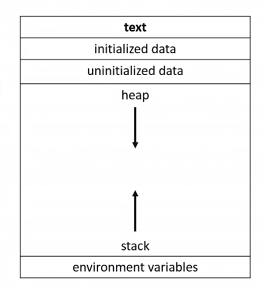
If you don’t set your pointers to null, then you may be tampering with data from other programs. (If not something meaningful) To create multiple pointers on the same line follow this format (int *px, *py, *pz;)
Dynamic memory allocation can be utilized thanks to pointers getting access to a block of dynamically allocated memory at runtime. This pool of memory is HEAP memory. (Prior to this point only stack memory has been used) Malloc(memory allocator)(size of (int)) will give you a pointer that allows you to utilize memory in the heap. If there is no more memory, it will return a null pointer. (using this memory will return a segmentation fault) Once you’re done using the data, you must free the memory, otherwise your program will crash due to a memory leak. To do this use free()
Call stacks: When you call a function, the system sets aside memory for that function to do its necessary work i.e. stack frames or function frames. Additionally more than one function’s stack frame may exist in memory at a given time. If main() calls move(), which then calls direction(), all three of these functions have open frames. The active frame is at the top of the stack where it is easiest to access.
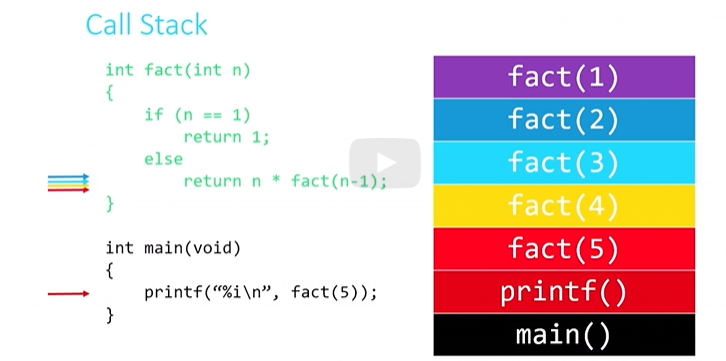
Once the base case has been completed, (fact(1)), it then moves on to complete the next executable function (fact (2)) until all have been completed.
Now you can store values of other variables to have the same address of another variable, and as well as manipulate the value.
File Pointers
int = 4 byteschar = 1 bytelfoat = 4 bytesdouble = 8 byteslong long= 8 bytesstrings=char * = 4 or 8 as they reference the address of the first character of a string and \0
Segmentation faults are a result of using garbage pointees. If you don’t dedicate space for values to be stored, and manually try to give a value it will end up taking a random piece of storage, becoming a garbage value.
int* x;
x = malloc (sizeof(int));
*x = 42 (directly allocates a value into specified piece of storage)
In order to store persistent data on a computer, you must introduce a FILE pointer. Common file pointers include, fopen(), fclose(), fgetc(), fputc(), fread(), fwrite()
fopen() opens a file and returns a file pointer to it (always check the return value to ensure the return value is not NULL) written as: FILE* ptr = fopen(<filename>, <operation>) An example of an operation is ‘r’ meaning read the file, w = write(overwrite/new) and a = append (edit/write)
fclose(<file pointer>); closes the file and is the co-operator of fopen()
fgetc() reads and returns the next character from the file pointed to. Can only be used when fopen() is read = r. Written as char ch = fgetc(<file pointer>);
EOF means end of file. (Looping fgetc(ptr) and then printing each character, until the EOF, will display the contents of the file in text
fputc() writes or appends a specified character to the pointed to file. (fopen() must have undergone the operation w or a in order for fputc() to function) It is written as fputc(”character”, “location” (e.g ptr2)); This now allows you to copy to files.
fread() Reads <qty> units of <size> from the file pointed to and stores them in memory in a buffer (usually an array and malloc can be used) <`buffer> File must be opened and read before operating fread(). Written as:
int arr[qty]
fread(<buffer>, <size>, <qty>, <file pointer>);
fwrite() Writes whatever file has been pointed to (that had been operated by a or w, and follows the same formatting of fread(); from buffer to file instead of vice versa
Additional functions
fgets() Reads a full string from a file. fputs() Writes a full string to a file.
fprintf() Writes a formatted string to a file. fseek() Allows you rewind or fast-forward within a file.
ftell() Tells you at what (byte) position you are at within a file. feof() Tells you whether you’ve read to the end of a file.
ferror() Indicates whether an error has occurred in working with a file.